Press kit
Press kit
Everything you need to write about snowscroll without emailing us first: boilerplate you can paste, a fact sheet, quotes you are welcome to use, the assets, and an honest list of what snowscroll does not do. If something here is missing or unclear, mail jun@snowscroll.com and you will get a real reply, usually the same day.
By Juhyun Nam · Updated 14 September 2026


Boilerplate, ready to paste
Three lengths, written to be copied as they are. No approval needed, no edits required.
One line
snowscroll is an iPhone browser that opens your social apps with the addictive feeds removed and everything else left alone.
25 words
snowscroll is a paid iPhone app that opens Instagram, TikTok and YouTube with the feeds removed, while your messages and the people you follow stay.
50 words
snowscroll is a calm browser for iPhone. It opens Instagram, YouTube, Facebook, X, TikTok and LinkedIn with the addictive feeds removed: Reels, Shorts, Explore, For You. Your messages, search, profile and the people you follow stay. Paid from the first launch: $49.99 a year or $9.99 a month, everything included.
100 words
snowscroll is a calm browser for iPhone that lets you keep social media without the endless scroll. It opens Instagram, YouTube, Facebook, X, TikTok and LinkedIn with the feeds engineered to hold your attention removed: Reels, Shorts, Explore, For You. Everything you opened the app for stays, including messages, search, your profile, notifications and the accounts you follow. It is not a VPN and it does not wall off an app. With your permission it sets a Screen Time shield, so a habit tap lands you in snowscroll, feed already gone. $49.99 a year or $9.99 a month, everything included.
Fact sheet
| What it is | A calm browser for iPhone that opens your social apps with the addictive feeds removed |
|---|---|
| App Store name | block the feed: snowscroll |
| Platform | iOS 16.4 or later, iPhone. No Android release yet, there is a waitlist for Android |
| App Store | apps.apple.com/us/app/block-the-feed-snowscroll/id6778488660 (app id 6778488660) |
| Launch date | June 13, 2026, first App Store release. Current version 2.1 |
| Category | Productivity |
| Supported apps | Instagram, YouTube, Facebook, X, TikTok, LinkedIn |
| What is new in 2.1 | One paid app with every feature included, and the shield moved into setup rather than being buried in settings |
| Price | $49.99 a year, which is about $4.16 a month, or $9.99 a month. Auto-renewing; cancel in your App Store settings. Every feature is included in both plans: all six apps, every feed surface, per-app daily limits and the shield. There is no unpaid version and no free period before you subscribe. A referral code from someone who already uses snowscroll grants free days. Prices checked September 14, 2026 |
| Founder | Juhyun Nam, sole founder and developer |
| Press contact | jun@snowscroll.com |
| Website | snowscroll.com |
Spelling: snowscroll is one word, all lowercase, even at the start of a sentence.
How it works, in one paragraph
snowscroll is a browser, not a VPN, and it does not wall off an app. You open snowscroll, sign in to Instagram or YouTube or any of the six supported apps with your own account, and use them the way you always have, except the feeds built to hold you there are not rendered: Reels, Shorts, Explore, For You. Your messages, search, profile, notifications and the accounts you follow are all untouched, because snowscroll works on feed surfaces rather than on whole apps. There is one thing it does at the device level: during setup it asks for Screen Time permission and ships Family Controls extensions, so that when you tap a supported app out of habit, that launch is caught by its shield and you land in snowscroll with the feed already gone. It redirects rather than refuses, sending you somewhere calmer instead of showing you a locked screen. Nothing is installed into Instagram itself and no traffic is rerouted. All of the feed filtering happens on your phone as the page loads, so snowscroll never sees your logins, your passwords, your messages or your browsing, and it never sees a Screen Time number. There is no snowscroll account to make.
Why snowscroll exists
The problem is not social media as a whole. It is that the parts people genuinely want, a message from a friend, a photo from someone they follow, a video they went looking for, are bolted to a feed engineered to keep them scrolling. Opening the app for one thing and losing an hour is the designed outcome, not a personal failure.
Every existing fix asks you to give up both halves at once. Deleting the app takes the messages with it. Screen Time and app blockers lock the whole app, so the moment you need a DM you tap past the limit, and the limit stops meaning anything. Founder Juhyun Nam built snowscroll after cycling through those tools and finding that none of them let him keep the people while dropping the feed.
So snowscroll takes the other route. Instead of a wall in front of the app, it is a quieter door into it. The feed is simply not there, which means there is no timer to beat and no limit to tap past, and the parts you actually came for are waiting where you left them.
Quotes from the founder
These are cleared for use. Attribute to Juhyun Nam, founder of snowscroll. You can lift them verbatim, no need to ask, and you are welcome to email for a fresh quote on your specific angle.
“I didn't want to leave Instagram. I wanted the messages and the people I follow, without the part that eats an hour. Every tool I tried made me choose between the two, so I built the one that doesn't.”
Juhyun Nam, founder of snowscroll
“snowscroll is a browser, not a wall. It filters what loads, on your phone, and the shield points a habit tap back at it instead of locking you out. There is no snowscroll account, and we never see your logins or your messages. That is the architecture, not a privacy policy we wrote afterwards.”
Juhyun Nam, founder of snowscroll
“We publish our own limitations on the website. I would rather someone read the honest list and decide snowscroll isn't for them than pay for it and find out later.”
Juhyun Nam, founder of snowscroll
What snowscroll does not do
We keep a public list of our own limitations at what to expect, and we would rather you quote it than discover it. For accuracy, these are the points that matter most:
- It does not wall off an app. snowscroll works on feed surfaces, not on whole apps. It does ask for Screen Time permission during setup, so its shield can catch a habit tap on a supported app and land you in snowscroll with the feed already gone. That is a redirect, not a wall: you still get in, you just arrive somewhere without a feed. If your reader needs a barrier they cannot get around, a hard blocker is still the better tool. We never read anyone's Screen Time figures.
- It is not a VPN, a DNS filter, or a content blocker for Safari. Nothing is installed into the social apps and no traffic is rerouted. Apart from the shield described above, snowscroll only affects what happens inside snowscroll.
- Push notifications do not come from snowscroll yet. They still arrive from the platforms' own apps if you keep those installed. We are working on it.
- Some features work differently. Voice and video calling are not available inside snowscroll, one-time photos and video sending in DMs are limited, and some story stickers, music and creator tools are not supported.
- It is a little slower than a native app, because it loads each platform's web version. Some of that friction is deliberate.
- Feeds can briefly return. The platforms change their websites often. Filter updates ship over the air, so it usually fixes itself without an app update.
- It is independent. snowscroll is not affiliated with, endorsed by, or partnered with Instagram, YouTube, Facebook, X, TikTok, LinkedIn or their parent companies.
- We have no usage statistics to give you. There is no snowscroll account and the feeds are filtered on the device, so we hold nothing about what anyone reads, watches or messages. What we do receive is narrow: purchases through RevenueCat, an anonymous ID paired with a referral code, and aggregate setup-funnel events (step name, app version, OS, device model, locale, campaign tag). None of that adds up to a usage number, and we will not estimate one. If a number is not on this page, we could not stand behind it.
Original research you can use
In August 2026 we counted the category rather than guessing at it. The iOS Attention Census is a census of 692 iPhone screen-time and app-blocker apps, run against Apple's public search API using twelve search terms frozen before any data was collected, with every app classified by hand from its own App Store description.
The headline number is the one most worth quoting: of 692 iPhone apps built to fight phone overuse, 511 (73.8%) block whole apps and only 49 (7.1%) act on the feed inside them. Other findings writers have used: the median app in the category is 8.4 months old, 72.6% have fewer than 50 ratings, and 13.9% now make you earn screen time through a task.
Everything is published: the full method and every number, the 692-row dataset as a CSV under a CC BY 4.0 licence, and a finder built on the same data that mostly recommends other companies' apps. The chart on the census page is free to reuse under the same licence. If you want a figure checked or cut differently, email jun@snowscroll.com and we will run it.
We publish the findings that are inconvenient for us too, including that snowscroll is neither the first nor the largest feed-level app in its own census.
Assets
These files are live on this site and free to use in coverage of snowscroll, in print or online, without asking first. Please do not alter the logo or use it to imply snowscroll endorses another product.
- App icon, PNG, 180 by 180
- Logo mark, SVG, vector, scales to any size
- Product screenshot of the snowscroll home screen, PNG, 620 by 1348
- Social card image, JPG, 1200 by 630
- Launch poster frame, JPG, 900 by 506
- Product video, MP4, 1920 by 1080, 25 seconds


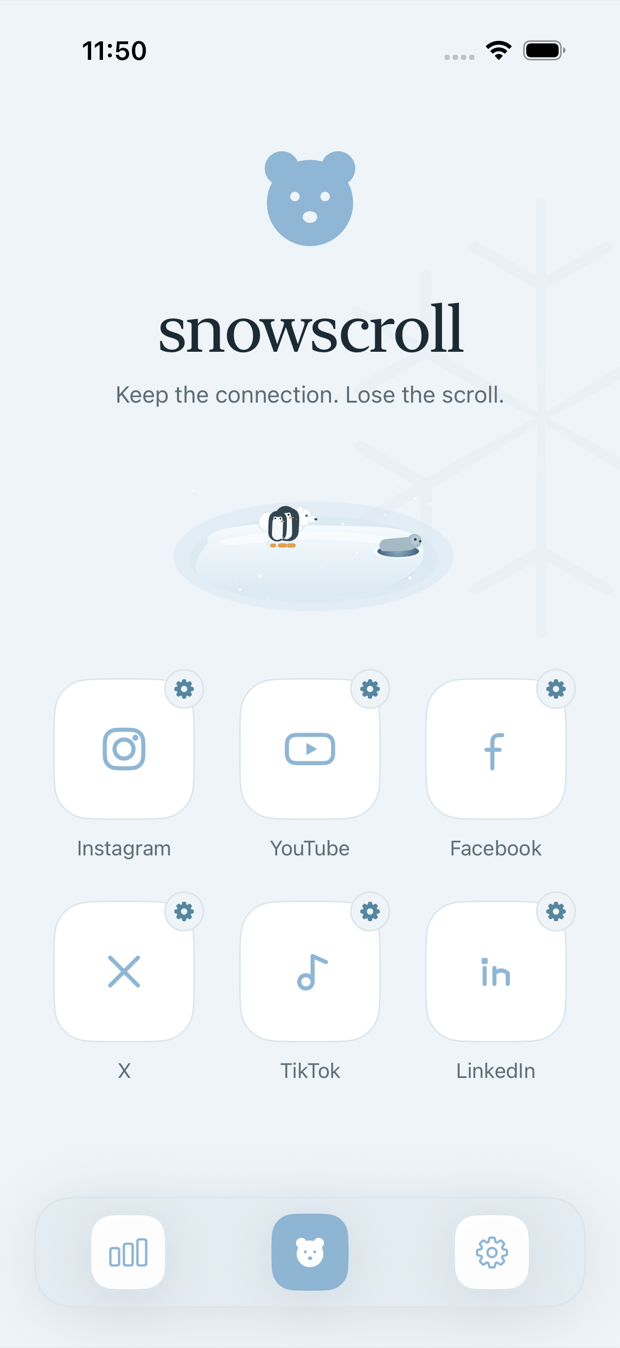


Need a specific screenshot, a higher resolution export, or a founder photo? Ask and we will send it.
Common questions from writers
How do you spell and capitalise snowscroll?
One word, all lowercase, always: snowscroll. Even at the start of a sentence. The App Store listing is titled block the feed: snowscroll. The founder is Juhyun Nam.
Is snowscroll an app blocker or a VPN?
Not a VPN, and not a blocker in the usual sense. snowscroll is a browser: it loads the mobile websites of the apps you choose and removes the feed surfaces as the page renders, inside its own window. It installs nothing into Instagram or any other app and routes no traffic anywhere. It does use Family Controls, though. With your permission it sets a Screen Time shield on the apps you pick, so a habit tap on Instagram is caught and lands you in snowscroll with the feed already gone. That is a redirect rather than a refusal, and Safari and the apps you did not pick behave exactly as they did before.
Can we use your screenshots and video in an article?
Yes. The logo, icon, screenshot, poster frame and product video linked on this page are free to use in coverage of snowscroll, in print or online, with no need to ask first. Please do not alter the logo or use it to suggest snowscroll endorses another product.
Can you share download or usage numbers?
No. There is no snowscroll account and the feeds are filtered on your own device, so we hold nothing about what anyone reads, watches or messages. What we do receive is narrow: purchases through RevenueCat, an anonymous ID paired with a referral code, and aggregate setup-funnel events. None of it adds up to a usage number, and we will not estimate one. If a number is not on this page, we could not stand behind it, and we would rather your piece be right than impressive.
Contact
Press, interviews, review copies and fact checks: jun@snowscroll.com. That reaches Juhyun Nam directly.
Everything else, including help with the app: support@snowscroll.com, or the public board at snowscroll.userjot.com.
Both inboxes are read by a person, not a queue. If you are on a deadline, say so in the subject line and you will hear back fast.
Keep going
For background on how this started, read the story behind snowscroll. The honest limitations live at what to expect, and the data question is answered in full on how snowscroll handles your data. If you are writing a comparison piece, how this differs from Apple Screen Time is the clearest starting point, and the frequently asked questions cover the rest.